
Teacher SLOs that use the 'Median Of' metric and pre and post test scores will have the SLO calculation displayed in the SLO after it is scored by the system. If an SLO is not the Median Of type that uses pre and post test scores to calculate an SLO score, then the SLO calculation feature will not be available.
To view SLO calculations, log into TEAMS and go to the SLO Management page. Locate the Median Of Pre Post SLO that was scored by the system and click on it, the SLO block will turn blue as shown below.

After clicking on the desired SLO, click the calculation icon (shown below) located in the right side pane.

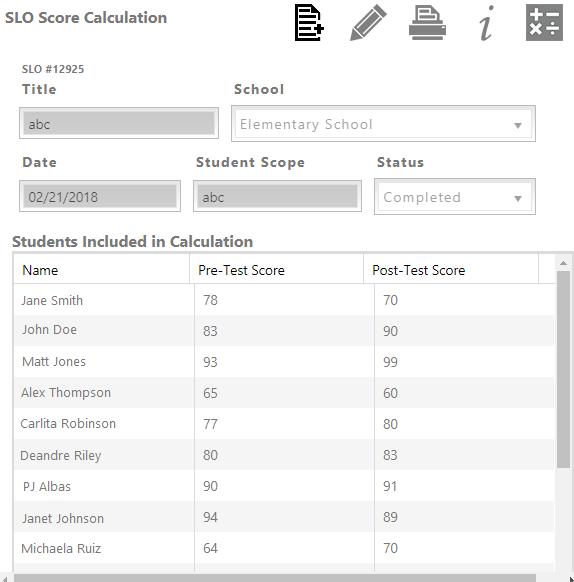
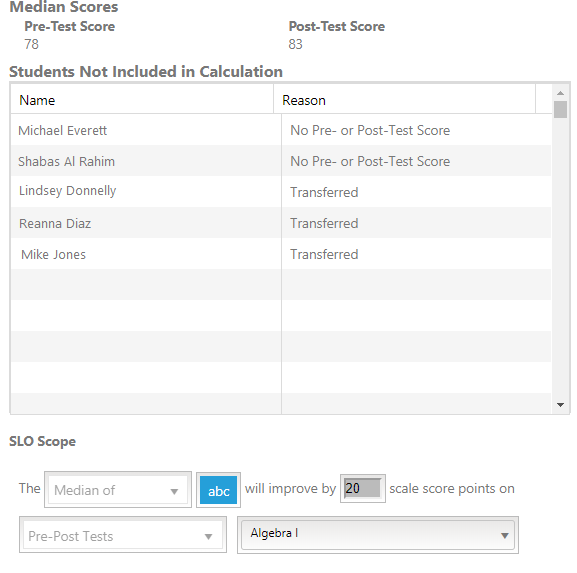
The SLO calculation details will appear as shown below. Scroll down the right pane to view information such as students included in the SLO score (and pre and post test scores for each student), the average pre and post test score, students not included in the calculation, the full calculation formula, and the final score.
The Students Not Included in Calculation list also provides a 'Reason' value, for example if a student has transferred to a different school or if their pre or post test score was not provided to TEAMS then this column will indicate such details.
If the scores displayed in the SLO Calculations tab appear to be incorrect, please contact your administrator. Administrators can then contact TEAMS Support regarding any issues with student score data that was imported into the system.
Comments
0 comments
Article is closed for comments.