
How do I manage content?
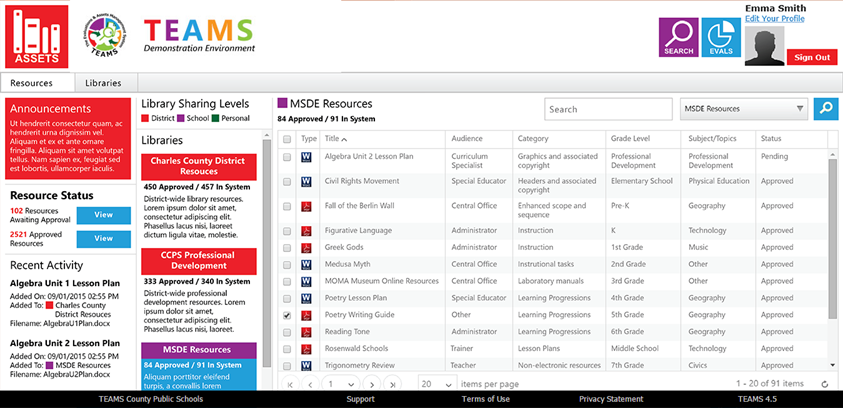
In TEAMS the Assets Hub module is used to store all the professional development assets in Libraries. These assets could be Instructional Assets, Test Items, Lesson Plans etc., In the context of evaluations, the Assets Hub module is used to store and catalog Professional Development (PD) content providing both teachers and administrators the opportunity to continuously improve.
To access your professional development content libraries:
- Select the Administration screen from the Evaluations Hub menu
- Under the topic "Resources" choose "Professional Development Resources"
- Use features in the Assets Hub to manage the professional development content you want made available to employees.
What kind of content can I add?
Content can be curated by your specialists, teachers, curriculum specialists and others or harvested from the internet and stored in private libraries or shared libraries. Content can be in any format, and it can be aligned to one or more standards.
This content is indexed automatically by a powerful search engine that allows the system to recommend relevant resources to evaluators while providing features for evaluees to search, preview, and play/download.
How do I know the content is approved?
TEAMS is structured for collaboration amongst content curators. The PD department can specify the workflow to have a content item created, tagged, reviewed and approved. The system is equipped to: send out notifications, gather comments and track the progression of a content item through the process. Once approved, the content item is published and available for others to consume.
Can I share my content with other districts?
Content libraries can be shared amongst schools or even school districts that are part of the TEAMS Network.
Comments
0 comments
Please sign in to leave a comment.